GraphiCode Subscription Code
Steps to get GraphiCode Subscription Code
The following steps generates the subscription code for license issue.


01
Download Software Installer
We are architects innovation trailblazers of technological advancement

02
Read Through License Agreement
We are architects innovation trailblazers of technological advancement

03
Generating The Code
We are architects innovation trailblazers of technological advancement
Step 1 : Product Software Installer

Before you proceed please download the software installer from
the following link below. Once complete, expand the application
download file to your local directory. Run Setup.exe file as Administrator
to start code generation. Select Next to proceed.
Step 2 : Accept Terms License Agreement
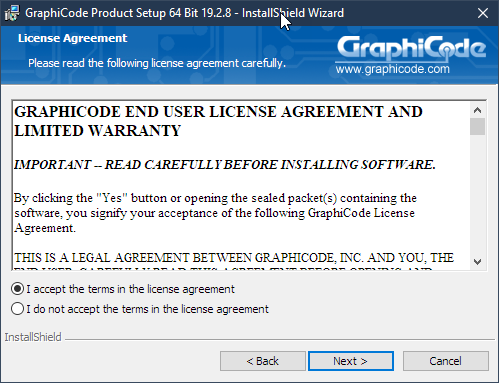
Read through the licensing agreement.- You will need to accept to move forward. Select Next when done.
Step 3 : Generating The Code
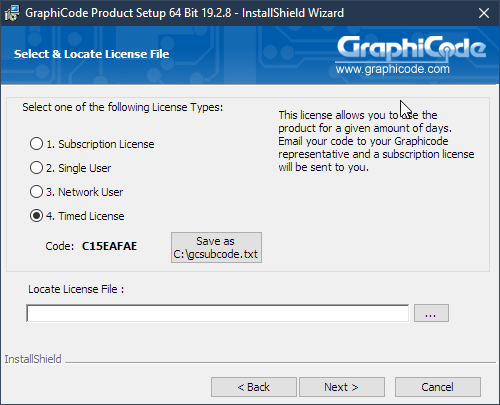
Select Item 4 Timed License. The license code is displayed below.
Click the Save As button to save tot he root directory. A file gcsubcode.txt will be saved to your root folder. email us this file.Completing ...
You can now select Cancel to close this dialog. Please keep the installer to continue install when you have received the license file to continue installation.
Get Your License Today !
Our sales team will be contacting you upon receiving your email.